
No.005 · Fan concepts · 2023, 2026
STRIKE (Fan Concepts)
A bitcoin app I use, redrawn twice: once around the one thing it already owns, and once around the thing it asks you to trust it with.
SENDING · The brand's hand mark, used as the send button.
- PROBLEM
- Sending sat behind a menu, and the bitcoin-backed loan asked for more trust than anything else in the app without earning it: custody never stated, risk shown as ratios behind tooltips.
- ROLE
- Self-directed. I redrew two flows as someone who uses the app: sending, and borrowing against bitcoin.
- RESULT
- A loan flow that answers, on screen, the three questions every borrower has: where is my bitcoin, what happens if the price falls, and what happens next.
- Role
- Fan concepts, self-directed
- Year
- 2023, 2026
- Work
- Payments · lending · trust
- Status
- Fan concepts
THE IDEA
Strike has a distinctive piece of branding: the hand. In the real app it only appears in the brand layer: launch screens, marketing, the odd illustration. This concept brings it forward and gives it a job, as the one control that's always on screen.
MAKING SENDING EASY TO FIND
Sending is the main reason the app exists, but it sat behind a menu as a row in a sheet. Here the hand sits in the centre of the tab bar, so the main action is the most visible thing on screen, and the same mark animates while the payment sends, turning a progress state into something people remember.
WHY IT MATTERS
People judge a payments app on how confidently they can do the main thing. Turning the brand mark into the send button shortens the path to sending and makes the app look like itself while you use it.
BORROWING
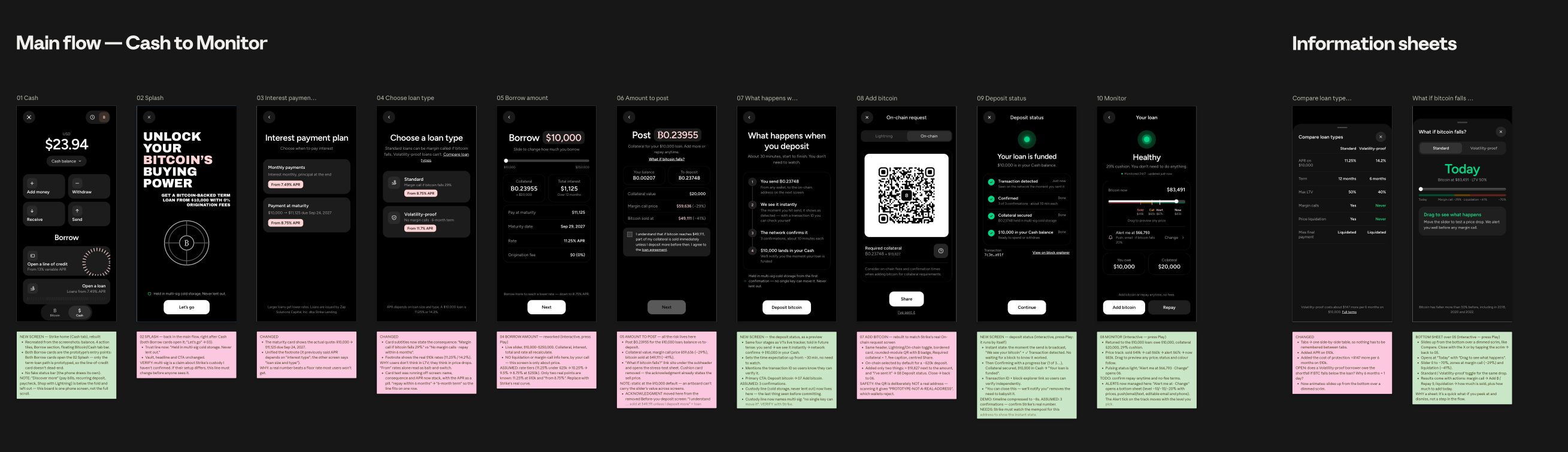
The loan flow, rebuilt so the risk is visible before you sign.
A bitcoin-backed loan asks for more trust than anything else in the app. You hand over the asset you least wanted to sell, in exchange for dollars, on terms that can end with it being sold for you. The current flow didn't earn that trust: it never said where your bitcoin is held, risk was shown as loan-to-value ratios behind tooltips, loan types sat in tabs, and it ended on a deposit screen with no idea what happens next.
THREE QUESTIONS
Every change answers one of three questions borrowers have, whether or not the screen answers them: where is my bitcoin, what happens if the price falls, and what happens next. If any of them is left open, the flow feels like it's hiding something.
SAYING WHERE THE BITCOIN IS
The first screen says where your bitcoin is held: in multi-sig cold storage, never lent out. It also says you can add bitcoin or repay at any time. Those two facts are the difference between lending your bitcoin to a platform and parking it as collateral, so they belong on the first screen, not in an FAQ.
REAL RATES
A “from” rate is a floor most borrowers will never get, and on its own it feels like bait-and-switch. So the interest plan shows the actual quote: $10,000 becomes $11,125 at maturity in twelve months, and the footnote gives the real rates on a $10,000 loan instead of the lowest one available.
COMPARING LOAN TYPES
Each loan type now states its consequence in plain words: “Margin call if bitcoin falls 29%” against “No margin calls · 6-month term”, at 11.25% against 14.2% on $10,000. The full comparison is a side-by-side sheet instead of tabs, so nothing has to be remembered between views, and it shows what the protection costs: about $147 more every six months to never face a margin call.
COST AND RISK AS SEPARATE STEPS
The old flow mixed what the loan costs with what could go wrong. Now they're two steps. The borrow amount is a slider from $10,000 to $250,000, with collateral, interest, total and rate updating as you drag, and nothing about liquidation. The next step, the amount to post, carries all the risk, and the acknowledgment that used to have its own screen now sits right above the Next button: “I understand that if bitcoin reaches $49,111, part of my collateral is sold.” You agree next to the number you're agreeing to.
RISK AS BITCOIN PRICES
Loan-to-value is the lender's number. Borrowers watch the bitcoin price, so risk is shown in prices: margin call at $59,636 (−29%), bitcoin sold at $49,111 (−41%), on the screen where you post collateral.
WHAT IF BITCOIN FALLS?
A bottom sheet lets you test a price drop without leaving the flow. It opens at today's price with “Drag to see what happens”, and the slider goes down to −70% through the margin-call and liquidation zones, with a toggle to see the same drop on the no-margin-call loan. Every result shows what you can do about it: at a margin call, add bitcoin or repay; at liquidation, how much would be sold and how much to add today to prevent it.
THE DEPOSIT
The deposit is explained before you send it and tracked after. A timeline previews the four steps (you send, we see it instantly, the network confirms it, $10,000 lands in your Cash) and says up front that it takes about 30 minutes and you don't need to watch. Once you send, a live tracker follows the same four steps, starting as soon as the transaction is broadcast. A transaction ID and block-explorer link let you check it yourself, and “You can close this. We'll notify you” means you don't have to wait on the screen.
THE LOAN MONITOR
The loan doesn't end at funding, so the design doesn't either. The Monitor leads with a status light and a plain status: Healthy, 29% cushion, you don't need to do anything. Below it, a price track marks where bitcoin would be sold, where a margin call happens, your alert and today's price; drag it to preview any price. Alerts can be set at −10, −15 or −20%, each shown as a price, by push, email or text. Add bitcoin and Repay sit at the bottom: the same two options promised on the first screen.
A NOTE ON THESE CONCEPTS
These concepts come from using the app, not from a brief, and they're labelled that way. Where the flow depends on things only Strike knows (the custody wording, rate tiers, the number of confirmations, watching the mempool for the instant deposit state), those are assumptions to check. The QR code in the prototype doesn't encode a real address.